When you use the Installation Manager to add or remove v11.components, it makes changes to the web.config file and applies the changes to all of the servers on your web farm. SharePoint keeps track of those changes so that they can be removed at a later date if you wish. The CorasWorks Installation Manager includes a tool called the Web.Config Utility that makes it easier for advanced users to view and remove these changes as needed. The utility can be accessed via the Tools menu at the top of the Installation Manager window.
The Web.Config Utility provides a way to selectively remove changes that have been made to the web.config file by installing v11 or other CorasWorks' components. It should be used with caution, and should not be used if any Workplace Suite v10+ or CorasWorks v11 components are still installed.
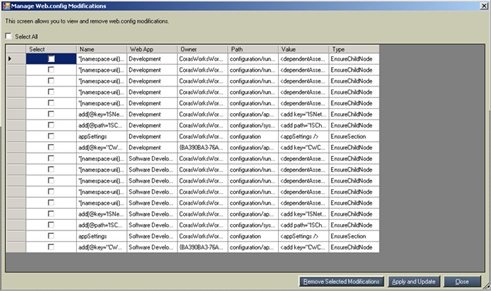
When you access this utility, a window like the one shown below is displayed. You can scroll through each of the modifications that have been made to the web.config file and resize the columns as necessary to see more information.
Figure 19: Web.Config
Utility
If you want to remove a modification that has been made to the web.config file, place a check mark in the Select column for that item and then select the Remove Selected Modifications button at the bottom of the page.
You can also click the Close button to close the utility without making any changes.